
October 19, 2026
Real-time image and sensor data
In this article:
What "real time" really meansResults, not pixelsSmall processors, real modelsPhysics gets a voteSources that fail differentlyThe field beats the benchmarkFrom feasibility study to deploymentKey takeawaysAt 30 frames per second, a device has 33 milliseconds to capture, move, process and act on each image, and then it starts again. Here is what makes real-time image and sensor processing hard, and what we have learned building cameras, sensors and edge AI devices.
What "real time" really means
"Real time" is often read as "fast". In image processing it means something stricter: on time, every time. A camera running at 30 frames per second delivers a new image every 33.3 milliseconds (1000 divided by the frame rate). At 60 frames per second the window shrinks to 16.7 milliseconds. Everything that happens to a frame has to fit inside that window, or the next frame arrives before the previous one is finished.
The window is shared. The sensor has to be exposed and read out, the image has to be moved into memory and prepared for the model, the model has to analyse it, and the result has to become a decision or a message. None of these steps gets its own 33 milliseconds. If preparation takes longer than planned, inference has less time.
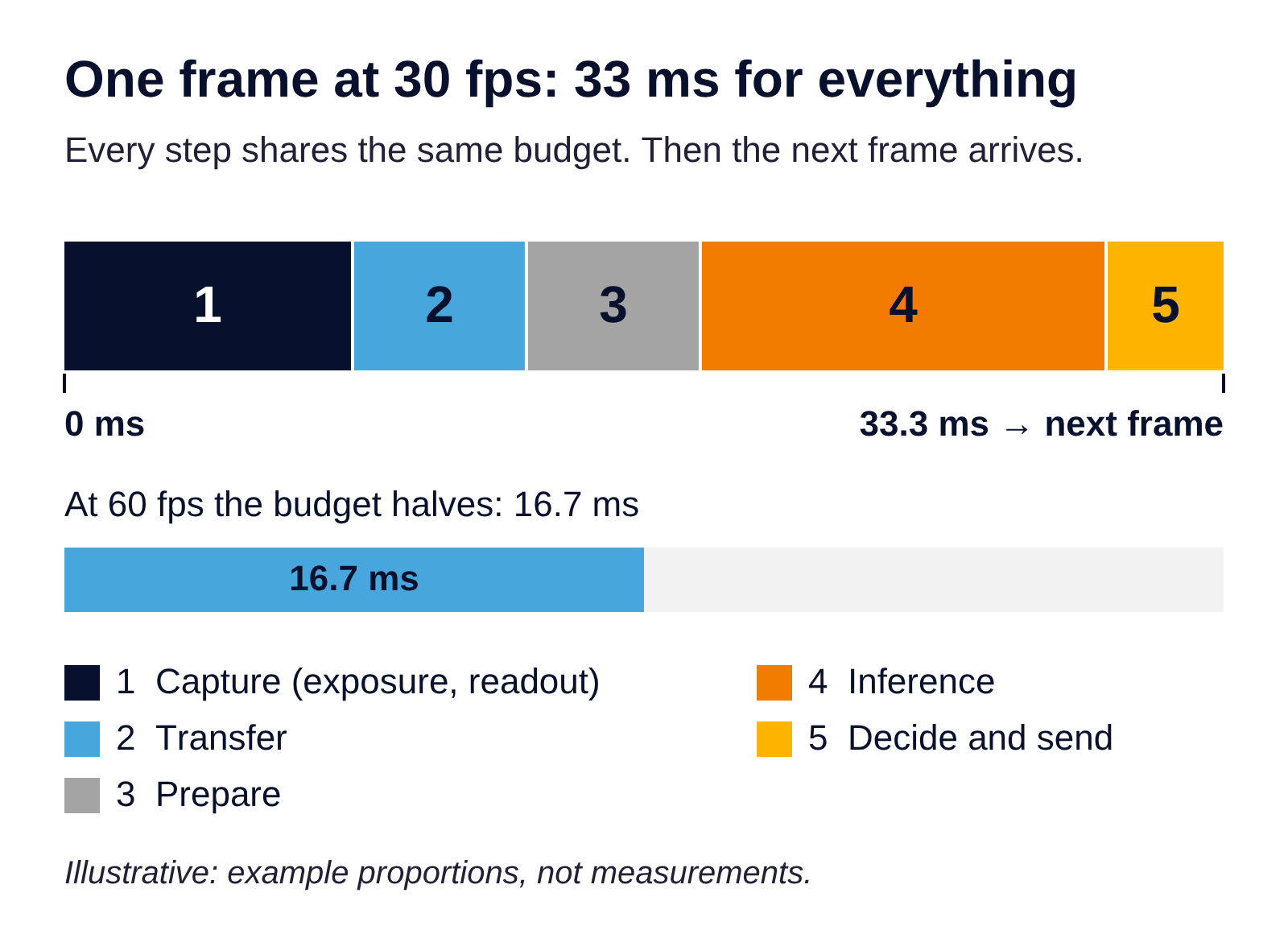
One frame's 33 ms budget at 30 frames per second (illustrative).
This is why an average speed says little. A system that handles most frames well within the budget but needs twice as long for an occasional frame is not a 30-frames-per-second system. It drops frames, or it builds a queue, and every frame in the queue is older than the one before it. For a statistic updated every quarter of an hour, a late frame is harmless. For anything that reacts to what the camera sees, it is the difference between a useful answer and a stale one.
Two terms help here. Throughput is how many frames per second a system can process. Latency is how long one frame takes, from the moment light hits the sensor to the moment the result is ready. Working on several frames in parallel can raise throughput, but it does not make any single frame faster. Real-time design is mostly about latency: a fixed budget per frame, and a clear agreement on which step may use how much of it.
Results, not pixels
The second constraint is bandwidth. A single uncompressed Full HD stream, 1920 × 1080 pixels with 8 bits per colour channel at 30 frames per second, is about 187 megabytes per second, or roughly 1.5 gigabits per second. Compression helps, at a cost in computing power and image quality, but continuous video remains one of the heaviest things a device can send.
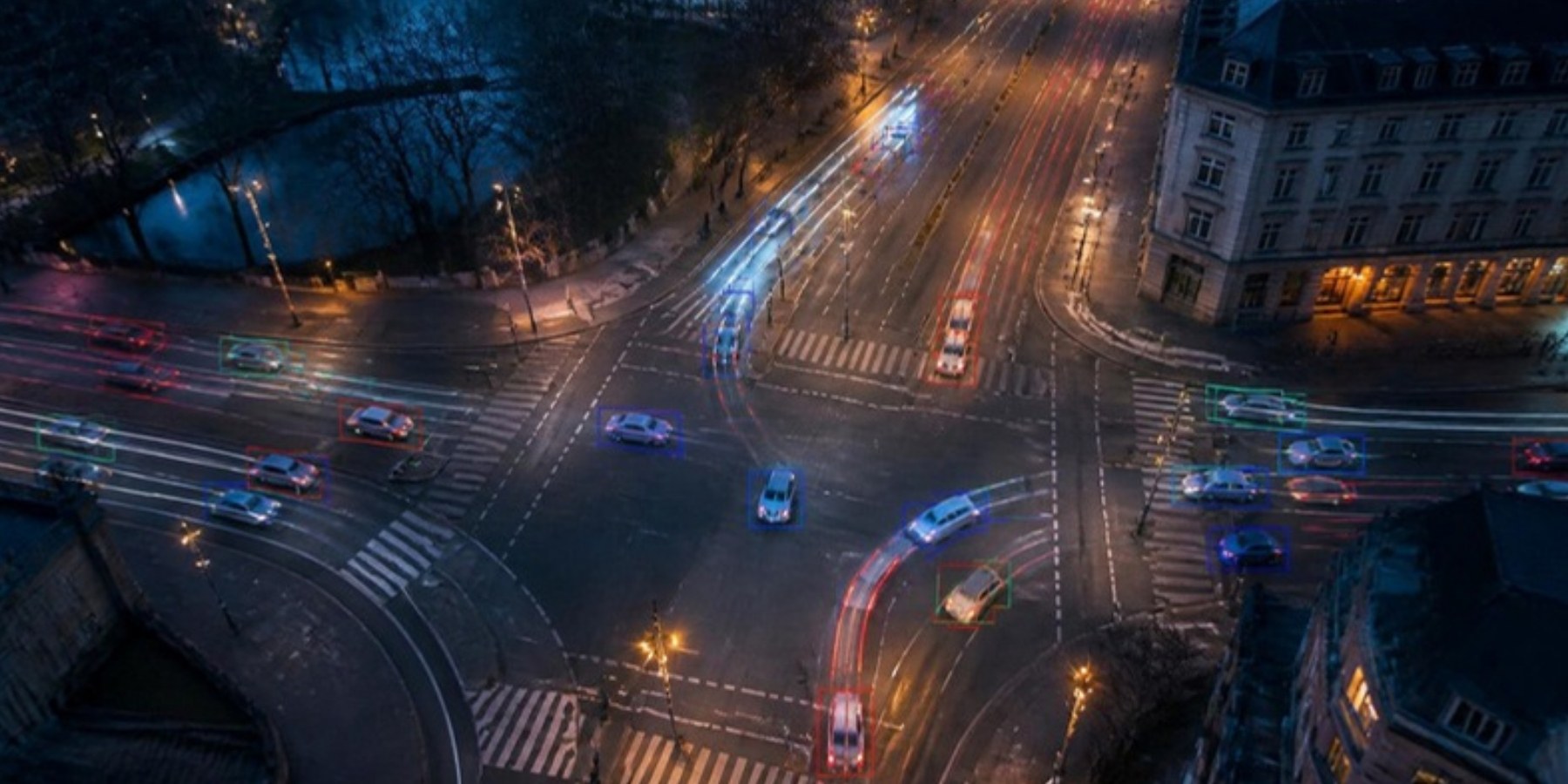
Most applications do not need the video. They need what is in it. A traffic planner needs counts per class, per direction and per quarter of an hour. If the device computes the answer where the image is created, the network carries a handful of numbers instead of a stream of pixels.
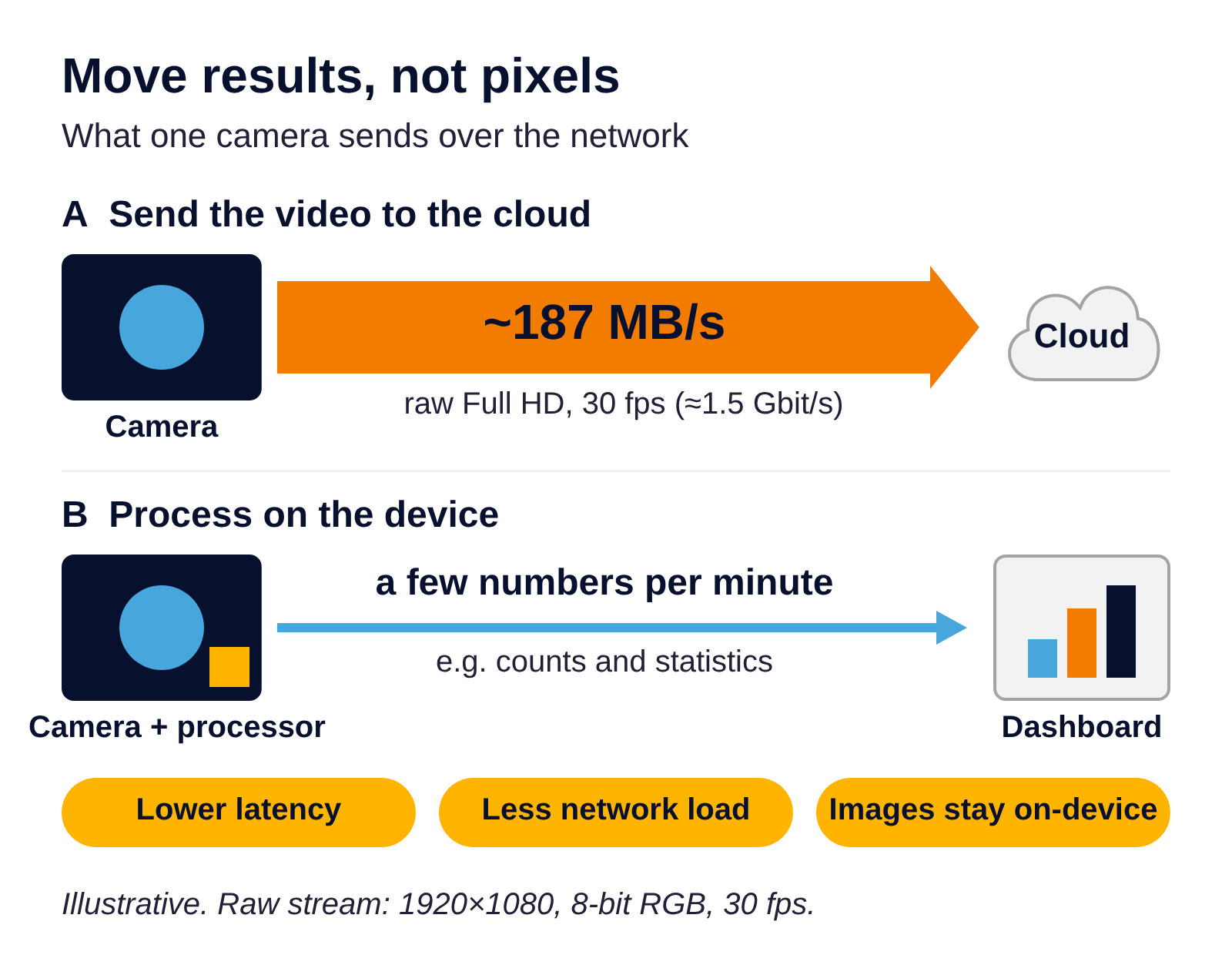
Raw Full HD video versus results computed on the device (illustrative).
Processing at the edge, on or next to the device, brings three benefits described in edge computing research:
- Shorter response time. The result does not wait for a round trip to a data centre.
- Less load on the network. A few numbers fit through a weak mobile connection that would never carry video, and roadside devices often have exactly that kind of connection.
- Privacy. Images that never leave the device cannot leak from a server or be reused for something else.
We saw all three in a research project on AI cameras for active mobility that we completed in 2024. Recording and streaming ran on the camera, detection models were chosen and deployed on the camera's own vision processor, and only anonymous statistics left the device. We described the project in Edge AI for mobility: what we learned counting pedestrians and cyclists. Our first AI camera demonstrator dates back to 2021.
Edge processing is not free: the device needs enough computing power, and the model has to fit it. The real question is not "edge or cloud" in general, but which data actually needs to travel.
Small processors, real models
On a server, choosing a model often starts with a benchmark table: the usual pick is the most accurate one that runs fast enough on the available GPU. On a device, the hardware comes first and decides which models are possible at all.
An edge AI camera runs inference on its own vision processor, so every model has to be converted into a format that processor understands. In our projects this requirement narrowed the choice far more than any published ranking suggested. The newest architectures are not always supported. Heavier models were not automatically better once they had to run on the device, because a more accurate model that misses the frame budget delivers fewer and later answers.
The same logic applies to memory and power. Low-power devices have little of both. One of our smart parking sensors reports in real time whether a parking space is occupied, and its program fits into 2 KB of memory. An extreme case, but it shows a habit that real-time embedded work rewards: deciding what the device really has to compute and leaving out everything else. We wrote more about processors, buses, power supply and firmware in What about firmware? A few steps to building the perfect IoT sensor.
In our projects, a few questions shaped the choice more than accuracy figures did:
- Which processor will run it, and which model formats does that processor support?
- How much of the frame budget is left for inference once capture, transfer and preparation are counted?
- What is the power budget, and does the device run on mains or on a battery?
- Which object classes, and which accuracy, does the use case really need?
It pays off to answer them before the hardware is chosen. In our experience, converting an unsupported model can take more effort than everything else on the device.
Physics gets a vote
Software can be fixed with an update. The physics of a sensor cannot, and it shows up in every real-time system that leaves the lab.
Rolling shutter. Many image sensors expose the image row by row rather than all at once. When the scene or the camera moves fast, straight lines lean, because the bottom of the frame was captured slightly later than the top. A global shutter exposes all rows at the same moment and removes this skew.
Motion blur. A global shutter does not solve everything. If the exposure is too long for the speed of the motion, the image is blurred anyway, and no model can recover detail that was never captured. This matters most when the camera itself moves, for example on a vehicle or drone.
Drift. Motion sensors measure acceleration and rotation, not where something is. A small, constant error in an accelerometer does not stay small: integrated twice to estimate how far something has moved, it produces an error that grows with the square of time. That is why motion sensors are almost always combined with another source.
The wrong sensor for the job. In one of our parking sensor projects, a real design question was whether to measure light or distance. The two react to different things, and a sensor that measures the wrong quantity produces clean, regular and wrong data.
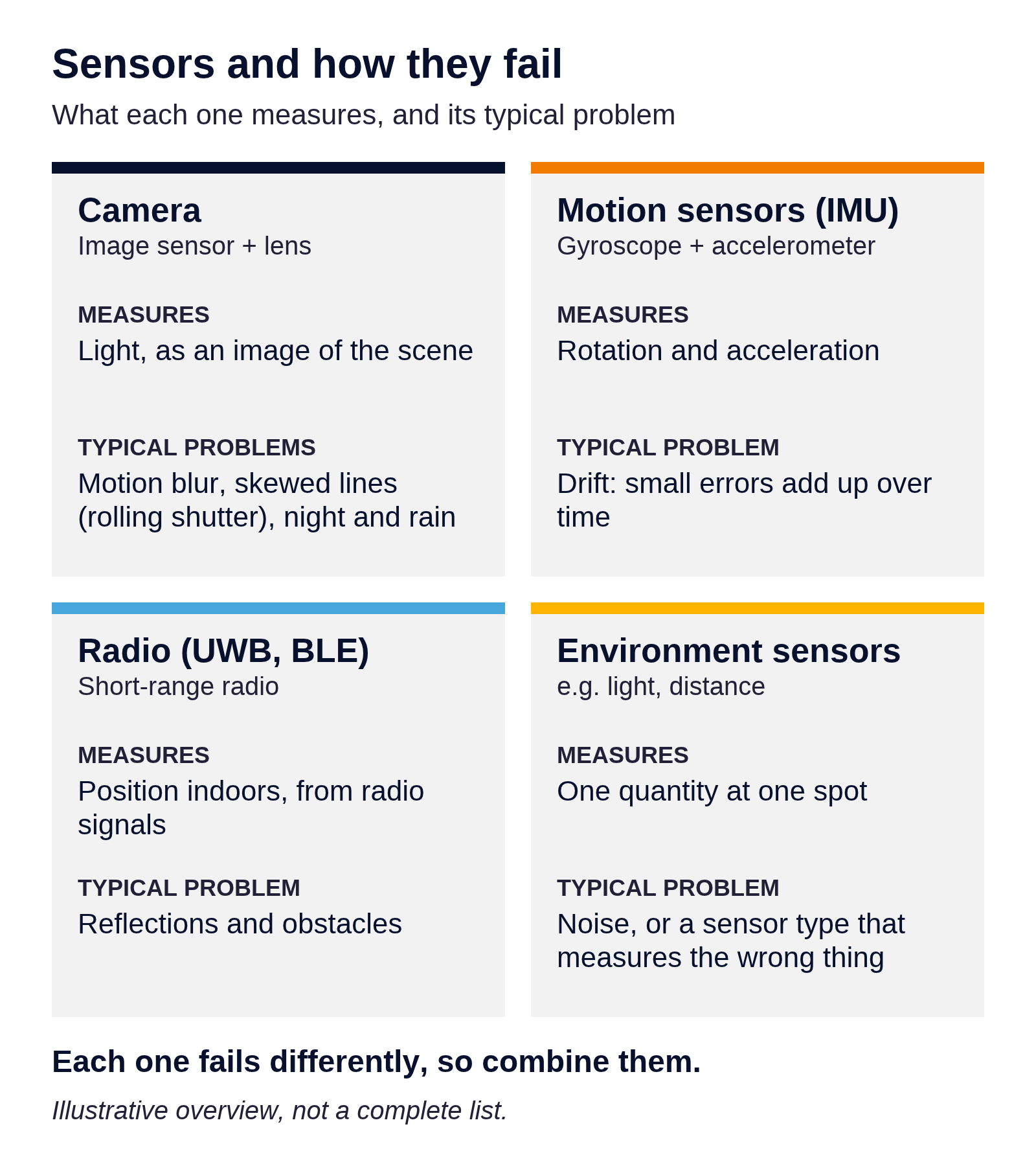
What common sensors measure and how they typically fail (illustrative).
Same moment, two clocks. Every sensor has its own clock. In real time, camera and motion data are combined at once, so the clock offset must be known before merging, not fixed afterwards. Methods differ by orders of magnitude: NTP typically keeps clocks within milliseconds, while PTP (IEEE 1588) on a local network gets below a microsecond with hardware timestamping. Camera–IMU calibration estimates this time offset along with the sensors' relative position. We met it in a video-EEG station that records two cameras together with the signal.
Sources that fail differently
No single sensor is good at everything. A camera sees a lot but struggles in the dark and blurs in fast motion. A motion sensor reacts instantly but drifts. Radio positioning gives an external reference but suffers from reflections. Environmental sensors are noisy. The useful insight is that they fail in different ways, so one can cover for another.
The classic way to combine them is the Kalman filter, published in 1960 and still a workhorse. The idea fits in two steps. First, the filter predicts: it uses what is known about how the system behaves to estimate its next state. Then it corrects: when a measurement arrives, it moves the estimate towards it, trusting each source according to how uncertain it is. A precise measurement pulls the estimate strongly, a noisy one only nudges it. The filter works recursively, one step at a time, which is exactly what a real-time system needs: it never has to look back over the whole history.
In plain words, a fast but drifting sensor fills the gaps between slower, more reliable measurements, and those measurements regularly pull the estimate back before the drift grows. How each sensor is modelled is where the real engineering lies, and it is different for every product.
We apply the same principle in our location and asset tracking work. On the indoor positioning side, our UWB solution worked with a precision of 5–10 cm, and asset tracking combines positioning with other sensors on the tracked object. In footfall analytics, people can be counted with cameras, 3D sensors or thermal sensors, and the right choice depends on the space, the light and what the data is for. We gave an overview of these technologies, from simple light beams to cameras, in Everyone counts: a few words about footfall analytics.
The field beats the benchmark
Published results are measured on public datasets, under the conditions those datasets contain. A real installation adds its own: night, rain, low resolution, crowds and a mounting position that nobody planned for. In our projects these factors changed results as much as the difference between models in a benchmark table.
Our field tests with AI cameras made this concrete. In light traffic, a lightweight detector with simple filtering came close to the manual reference. In busy periods, with groups passing at once, every model struggled: people were merged or missed. Mounting mattered as much as the model. Counts were best where paths did not cross and people did not linger at the edge of the field of view, and installation height changed the results, especially in crowds. Tuning the detection threshold turned out to be a trade-off, not a fix: a lower threshold found more objects, and many more false ones.
We have learned that a real-time system has to be tested where and how it will run. A few rules have served us well:
- Recording first, comparison second. We record real footage at the target location and run every candidate model on the same recording. Comparing models on different days or scenes compares the weather, not the models. On edge cameras we built recording and replay into the device for this, because detection normally runs on the live stream.
- A manual count as the reference. For counting tasks, our reference is a manual count of the same footage. It is slow, and it is the only way to know the real error.
- A common measure. For detection quality, the standard measure is mean average precision (mAP) as defined for the public COCO dataset. A detection counts as correct when the predicted box overlaps the real object enough, measured as intersection over union (IoU). COCO mAP averages precision over ten IoU thresholds, from 0.50 to 0.95 in steps of 0.05, so it rewards models that locate objects precisely, not just roughly.
- What the use case needs. mAP shows how well a model finds objects in single images. A counting application also needs the right count over time, in each direction, in quiet and busy periods. Both numbers matter, and they do not always agree.
- Quiet and busy hours. A quiet pavement makes every model look good. We test in quiet and busy periods alike, and night and bad weather belong in a test plan too.
- Testing after the first success. Real-time systems change: firmware updates, new models, a remounted camera. We run manual and automated tests, with a test report at every stage, to see whether a change that helps in one place breaks something elsewhere.
Benchmarks are a good way to build a shortlist. The decision belongs to the field test.
From feasibility study to deployment
Real-time image processing projects rarely fail on the model. In our experience they fail earlier: on data access, on costs nobody planned for, or on the question of who will run the system. So we work in three steps.
1. Feasibility study. Before development starts, we check whether the problem needs AI at all, what data is available, what the system will cost to build and run, and whether processing should happen at the edge or in the cloud. Data protection (GDPR) and the AI Act are part of the design from the start, not an audit at the end. We described what such a study covers in Before you build AI: feasibility, data, ethics and regulation.
2. Proof of concept on real data. A proof of concept runs on data from the target location, in the conditions the system will face. In our AI feasibility study for traffic analysis, the biggest barriers turned out to be access to data and the operating model, not the accuracy of the model. Many cities do not offer direct access to their camera streams, and some organisations may only operate such systems with their own staff. Both are cheap to find out early and expensive to discover late.
3. Deployment on the device, with field tests. The final system runs where the images are created. For us, that means choosing hardware with the models in mind, building recording and replay into the device so that it can be tested, and running field tests at the real mounting position against reference data.
Real-time constraints touch every layer, which is why we cover the whole chain with one team: firmware and electronics, communication protocols such as UWB, LoRaWAN, RFID and ZigBee, and the AI models on top. We describe both sides in more detail under IoT development and AI services.
Key takeaways
- A time budget per frame. At 30 frames per second, every step from capture to decision shares 33 milliseconds. The late frames, not the average, decide whether a system keeps up.
- Results, not pixels. Raw Full HD video is about 187 megabytes per second. Computing the answer on the device and sending a few numbers is faster, lighter on the network and keeps the images private.
- Sensors that fail differently. Cameras blur, motion sensors drift and radio suffers from reflections. Combined, for example with a Kalman filter, one source covers for another.
- The field over the benchmark. Crowds and the mounting position changed our results as much as the choice of model, so we test on recordings from the target location.
If you are working on a device that has to see, measure and react in real time, we are happy to talk it through: get in touch.

Get a quote or advice

Let’s investigate your project concept and its current status together.

Expect an initial project scope proposal, time and cost estimation from us.

The consultancy will be protected by the NDA.